

The “Settings” section inside Serlzo’s Lead Generation tool is built to help you automate lead follow-up and manage your leads more efficiently so you don’t just collect names, you actually move people through your sales process.
But first, you need a way to collect those leads. If you are running a webinar or event, here is how to create a high-converting lead page using Serlzo’s Webinar Template
One key feature inside Settings is called Stage Management. It allows you to build your own visual sales pipeline, track where each lead stands, and follow up with the right message at the right time without relying on memory or spreadsheets.
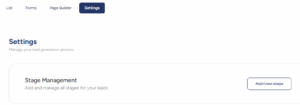
Stage Management
Stage Management allows you to define and customize these steps to align with your business operations. Whether it’s “New Lead,” “Interested,” or “Ready to Buy,” you can create stages that accurately reflect your sales funnel.
How it Works:
Click “Add/view Stage” to access the editor.
Here you will find:
- Stage Title: This is where you name your stages, such as “New Lead,” “Follow-up Needed,” or “Closed Deal.”
- Stage Color: Assign a distinct color to each stage for quick visual identification.
- Delete Button: Remove any stages that are no longer relevant.
- Add Another Stage: Easily expand your funnel by creating more stages.
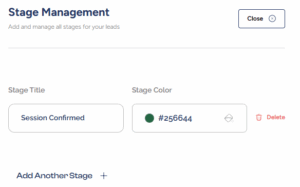
This setup is especially helpful when you are handling lots of leads, it gives you a quick overview of who needs follow-up, who’s close to buying, and who’s gone cold.
How the Settings Feature Helps You Work Smarter
The Settings section is not just for organizing leads, it’s about building a system that does the heavy lifting for you.
With Stage Management, you can:
- Create a clear sales workflow.
- Track every lead’s status at a glance.
- Stay on top of follow-ups.
- Avoid letting leads slip through the cracks.
Whether you are a solo entrepreneur, a virtual assistant managing client accounts, or part of a sales team, this feature helps you work like a pro.
Ready to organize your lead Pipeline? Head to your Serlzo dashboard and open the Settings panel to set up your custom lead stages with Stage Management.