
Building a landing page from scratch can be a real headache. That’s precisely why Serlzo created the Page Builder, a core part of its Lead Generation tools. It’s designed to help you launch ready-to-use lead pages in just a few clicks.
With Serlzo’s DFY (Done-For-You) Page Builder, you simply pick a page type, connect your form, choose a beautiful template, and go live! No coding, no stress, and everything works seamlessly right inside your dashboard.
Let’s dive into the super-simple steps to get your DFY lead page live.
Kickstart Your Page Creation
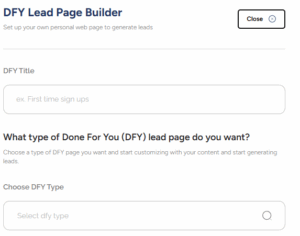
Your journey begins in the Page Builder. Click the Create DFY Page button. You will then be prompted to fill out a few key details:

- DFY Title: This is your page’s internal name, helping you quickly identify its purpose later. “Webinar Opt-in Page” or “Video Sales Funnel.”
- Choose DFY Type: This selection dictates the kind of DFY lead page you are building. Your choice here influences the layout and features available in the templates that follow.
Select Form: Pick one of your existing Serlzo forms that will collect leads on this page. Any form you have already created, with fields like Full Name, Email, WhatsApp Number, will work perfectly.
After filling these out, click Continue.
Pick Your Perfect Template
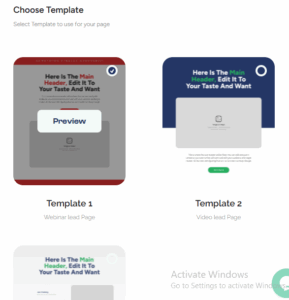
Next, you will land on the template selection page. This is where you get to choose the visual blueprint for your new page.
Serlzo currently offers three awesome DFY templates, each tailored for a specific campaign goal:
- Template 1 – Webinar Lead Page: Ideal for online classes, training sessions, or live events. It’s built to quickly collect registrations and highlight all your event details.
- Template 2 – Video Lead Page: Perfect if you want to showcase a product, service, or message using video. This layout provides dedicated space for your video alongside your lead capture form.
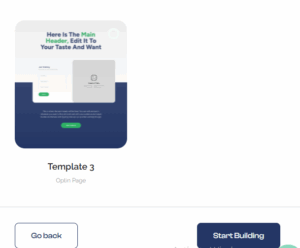
- Template 3 – Opt-in Page: Great for short, direct opt-in campaigns. It keeps things simple and focused, just a headline, some explanatory text, and a form. Use it for free guides, WhatsApp list sign-ups, or quick offers.
Click on the one that best matches your campaign’s objective.
You will see a “Go Back” option on the left if you need to tweak your previous inputs. When you are happy, click Start Building on the right to move forward.
Customize Your Page
So, you have chosen your perfect template (Let’s say you picked the Webinar Lead Page).
Here’s what you will find on the builder and how to make it your own:
Edit the Headline and Sub-Header
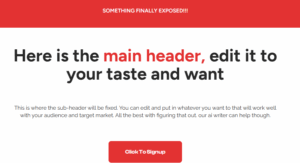
At the top, you will see the title: “Something Finally Exposed”. This is the attention-grabbing headline that pulls visitors in.
Below that is a section that says:
“Here is the main header, edit it to your taste”.
This is your sub-header, a perfect spot to briefly explain what your webinar is about or what the audience will gain. Make it clear, concise, and relevant to your target audience. Don’t worry if you are stuck, Serlzo’s built-in AI Writer can help you generate ideas.
Set Up the Call-to-Action (CTA)
Next, you will see a button labeled “Click to Sign Up.” When you click this, a form opens.
Here’s what to do:
Add your WhatsApp number or preferred contact method.

Scroll down and upload a promotional image or video. This media should be eye-catching and relevant to your event.
Highlight What They Will Learn
One of the most important sections for any webinar page is explaining what attendees will learn. Scroll down to find this segment titled: “What They Will Learn”

You will see four boxes by default:
- Learn 1
- Learn 2
- Learn 3
- Learn 4
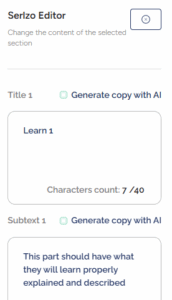
Each box includes a placeholder text: “This part should have what they will learn properly explained and described.”
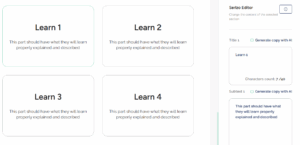
Edit each of these to describe the core takeaways from your webinar. Be specific. Don’t just say “Marketing Strategies,” say “How to generate 100 leads in 5 days using WhatsApp automation.”
You can also add an extra subtitle at the top of this section to provide more context. This helps draw attention or summarize the session in a catchy line.
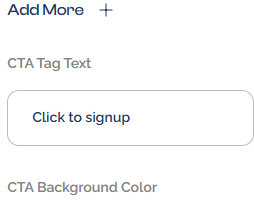
Need more than 4 points? There’s an “Add more” button. Use it to include all the juicy benefits of your webinar.
Customize the CTA Button Appearance
Further down, you will be able to edit:
CTA Tag Text – Change this from “Click to Sign Up” to something like “Reserve My Spot” or “Join the Class”.
CTA Background Color – Adjust the button color to match your brand or draw more attention.
Preview and Publish Your Page
At the top of the builder, you will see:
- Preview – Use this to see what your audience will experience.
- Publish Page – Click this when you are ready to go live.
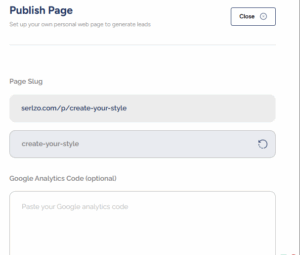
Before you hit publish, a quick form appears:
Page Slug – Customize your URL ending
Google Analytics Code (Optional) – Track performance.
Facebook Pixel Code (Optional) – Great for retargeting ads.
Page Description – Write a short description. This helps with SEO, so make it keyword-rich and relevant.
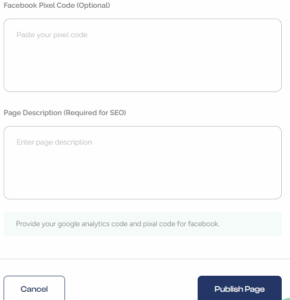
Click Publish Page, and just like that, your lead page is live!
Ready to transform your lead generation game? Head to your Serlzo dashboard and build your first DFY Page today. You will be amazed.