
In today’s competitive market, generating a steady stream of qualified leads is the lifeblood of any successful business. But just generating leads isn’t enough. You need an efficient system to organize, manage, and nurture them. That’s where Serlzo comes in.
Serlzo is a powerful marketing automation platform designed to optimize your entire sales process, from capturing leads to closing deals. Let’s take a dive into Serlzo’s lead generation features and show you how they can help you work faster, smarter, and more effectively.
Mastering the ‘Lists’ Feature on Serlzo for Efficient Lead Organization
In a dynamic world of digital marketing, staying organized is key to converting leads into loyal customers. If your leads are scattered across various platforms, it’s time to discover Serlzo’s ‘Lists’ feature. This powerful tool is designed to bring order to your lead generation efforts, making sure no potential customer slips through the cracks.
What Exactly is the ‘Lists’ Feature?
Think of Serlzo’s ‘Lists’ feature as your personal, highly efficient filing system for leads. It helps you group and categorize leads based on their origin. Whether they signed up through a landing page, a giveaway, a webinar, or a specific form, ‘Lists’ ensures every lead has its designated home. This means you can easily track and manage leads from different campaigns without the usual chaos.
How to Create and Manage Your Lists (Step-by-Step)
Getting started with ‘Lists’ is incredibly straightforward. Here’s how you can set up your first lead list in just a few clicks.
Access Your Lead Generation Dashboard:
- Log in to your Serlzo account
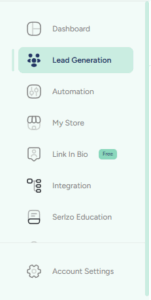
- From the left sidebar, click on “Lead Generation”
- Then, navigate to the “Lists” tab. This is your command center for all things lead organization.
Create List:
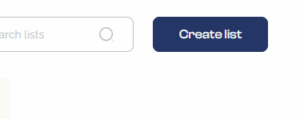
- Once you are in the ‘Lists’ tab, click the “Create List” button.
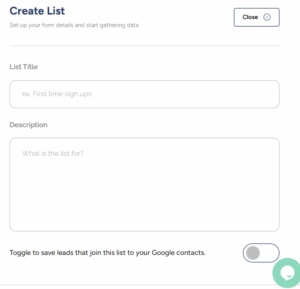
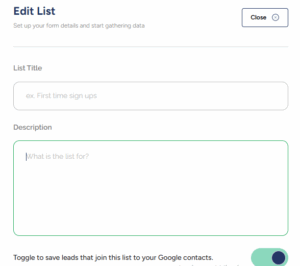
- A pop-up will appear, prompting you to fill in a few details:
– List Title: Choose a clear, descriptive title (e.g, “Giveaway signups – July,” or Ebook Downloads”).
– Description: Add a short description. This is a helpful reminder of where these leads originated, especially useful as your list grows.
– Toggle ‘Save leads to Google Contacts’: For seamless integration, you can opt to automatically add these contacts to your Gmail contacts. This saves you valuable time and ensures your contacts are always up-to-date across platforms.
Save Your List:
- After inputting your details, simply hit the “Create button”. Voila! Your list is now ready to receive and organize your leads.
Managing Your Lists:
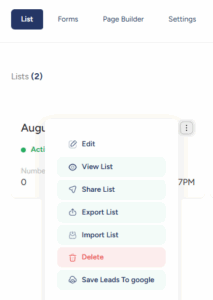
Once you have created a list, you will notice a three-dot menu next to it. Clicking on these dots reveals a dropdown with options to manage your list and its leads.
Edit: This option lets you update your list’s title or description.
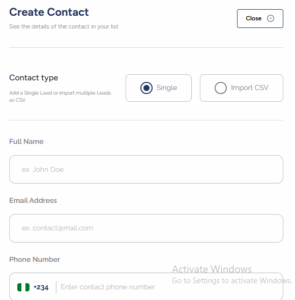
View List: This allows you to see all contacts in your list. You can also add new contacts one by one or upload many at once using a file.
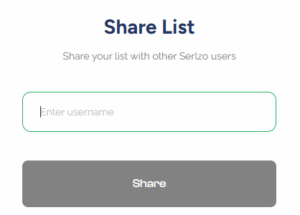
Share List: You can share the list to another Serlzo user.
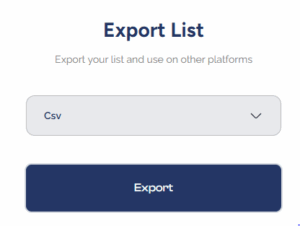
Export List: Download your list so you can use it somewhere else. It saves the list as file (CSV)
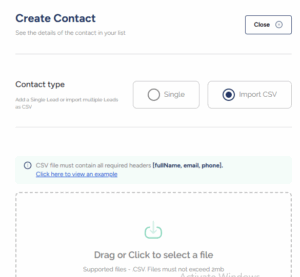
Import List: This allows you to bring in contacts from outside Serlzo.
Delete: You can remove the entire list and all the contacts inside it.
Save Leads to Google: This is a quick way to sync your leads directly to your Google contacts with just one click.
How This Feature Helps Your Business Grow Faster
Using the ‘Lists’ feature goes beyond mere organization; it provides tangible benefits that contribute directly to your business growth:
- Track Your Leads Easily: You can group them by where they came from or what they are interested in, so you always know how to follow up.
- Find the right leads fast: You can see where they came from and follow up at the right time, helping you make better marketing decisions.
- Automated syncing: Syncing with Google Contacts saves you time by updating everything for you, so your contacts stay organized without the stress.
Real-World Use Case Example
Let’s say you are the savvy owner of the style solution, a trendy fashion brand. You just wrapped up a highly successful online giveaway, and now you have a flood of new contacts. What’s next?
With Serlzo’s ‘Lists’ feature, you’d simply create a list called “Giveaway Leads – July.” Every participant from that giveaway would then be automatically added to this dedicated list. When you are ready to send a special offer, an exclusive preview of new arrivals, or a thank you message, you know exactly where to find them. This focused approach makes engaging with your audience super easy and incredibly effective, helping you nurture those leads into paying customers for the style solution.
Want to keep your leads organized and easy to manage? Serlzo’s Lists feature helps you work faster, and turn more leads into paying customers.